GNU screen graphics font spacing problem
How to fix broken curses graphics fonts in GNU screen and Terminal.app.
Problem
Driving me crazy was how badly ncurses apps looked under remote screen sessions accessed with Terminal.app (à la Mac OS X). The graphics characters (corners, pipes, tees, etc) appeared correct, but there was space between the characters. This turned all the pretty boxes into super-wide, ugly nightmares. Below is the result of some test code I found on the GNU Screen FAQ.
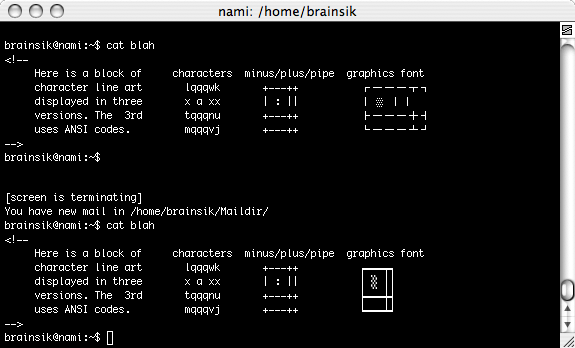
As you can see, the graphics are broken under screen but work fine outside of screen. What's going on!?
Solution
Turns out, the culprit is UTF-8 encodings. There are two things you need to turn off. First, you need to make sure you aren't starting screen up in UTF-8 mode. Check your .screenrc file for utf8 settings and make sure you aren't starting screen with the -U argument. Second, you need to make sure your LANG environment isn't set to a UTF-8 variant. For example, on some of the systems I use LANG is set as LANG=en_US.UTF-8. To get around this, you can start screen while explicitly setting the LANG environment.
$ LANG=C screen